When I wrote about MCP last year (MCP and AI: The New Communication Language for Smart Systems), every example I used was cute: a smart lamp, the weather, a Spotify playlist. The most common question I got back was, "okay, but how do I actually set this up against a real company system, with real customer data?" This post is my answer to exactly that.
Because there's a huge gap between writing a "hello world" MCP server and designing one that connects to your production CRM, your billing system, or your customer database. One is a weekend project. The other is the kind of thing that gets your security team to schedule a meeting with you 😅
From Hobby Project to Enterprise System: What Changes
A demo MCP server usually looks like this: a handful of functions hitting a single API, one API key for auth, errors that just get logged to the console and shrugged off. That's great for learning. But in production, that approach quietly ignores three questions: who is making this request, what are they actually allowed to do, and who — and when — will be able to ask why it happened.
In an enterprise setting, an MCP server stops being a "toolbox" and becomes a trust boundary. Design it wrong, and you've built a door that the model — or anyone who manages to abuse the model — can walk straight through into your production database. You never want that door to exist.
Pattern 1: The Gateway MCP Server
The healthier approach isn't writing a separate MCP server for every internal service — it's standing up one gateway MCP server that sits in front of your internal APIs. Think of it like a company's front desk: nobody walking in off the street gets to wander straight into accounting, HR, or the server room. They stop at reception, show ID, and say who they're there to see.
A gateway MCP server plays exactly that role:
- All tool definitions live in one place instead of being scattered across a dozen services.
- Authentication and authorization pass through a single, central checkpoint.
- Logging, rate limiting, and monitoring get applied at one layer instead of being reinvented per service.
- When your internal systems change (say, you migrate to a new CRM), you update the gateway — the interface exposed outward stays the same.
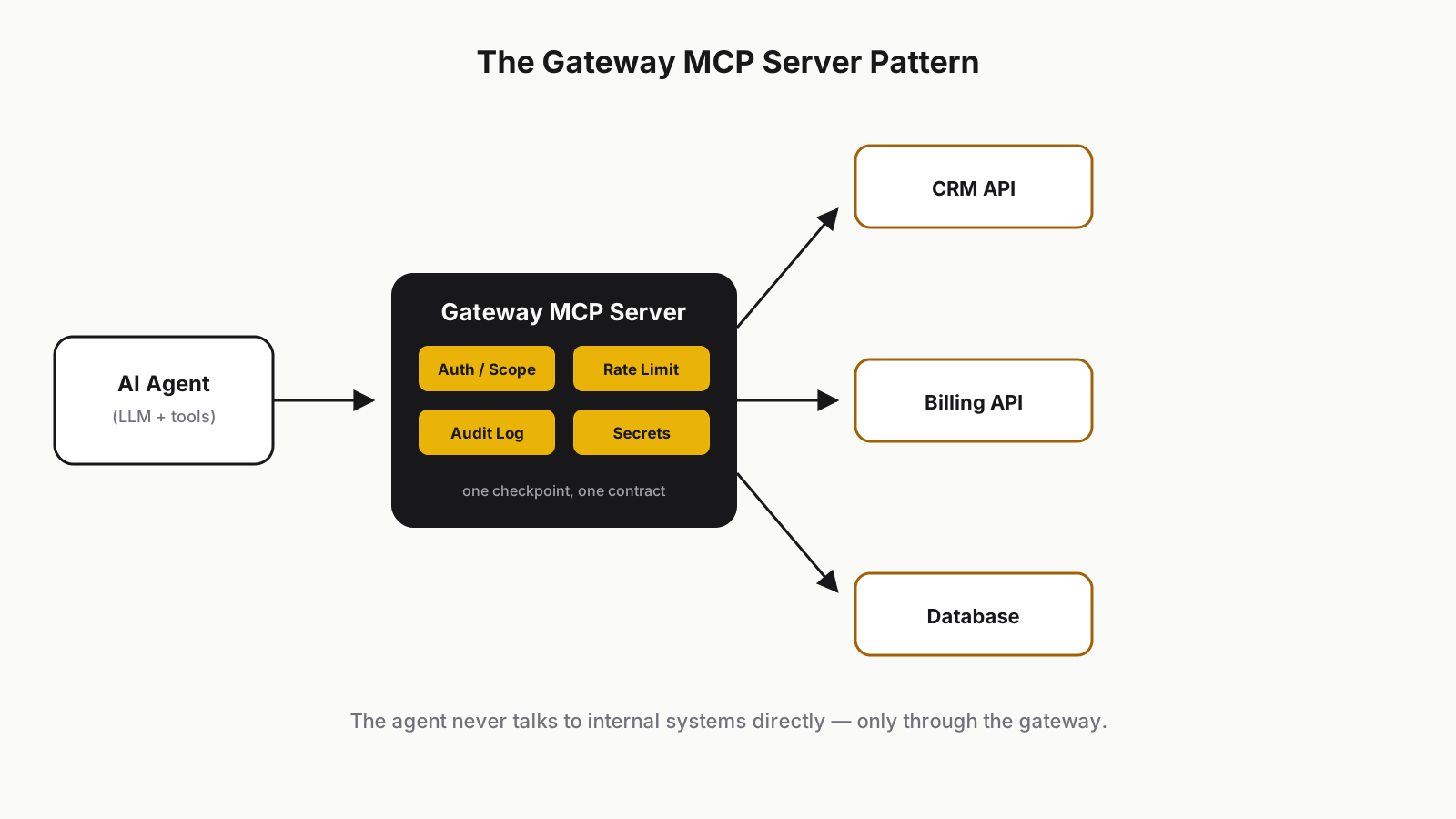 Gateway MCP server: an AI agent reaches internal systems only through one authorization layer
Pattern 2: Permissions and Scoping
Giving a model the power to "do anything" is a lot like handing an intern the root password to every system in the company. Even with the best intentions, someone eventually runs DROP TABLE customers by accident — except this particular intern can sometimes fire off a thousand requests a second.
In an enterprise MCP design, every tool needs a clear answer to who can call it and under what scope:
- Role-based access per user: a sales rep only sees customers in their own territory, the finance team gets access to billing tools.
- OAuth scopes: every tool explicitly declares what scope it requires —
crm:read,crm:write,billing:refund, and so on. - Short-lived, session-bound credentials instead of one permanent key that never expires.
Pattern 3: Separate Read-Only Tools from Action Tools
This is, in my opinion, the most commonly overlooked pattern. In an MCP server, "fetch customer info" and "delete customer" should never sit at the same trust level. I split tools into two clear buckets:
- Read-only tools:
get_customer,list_invoices,search_orders. These return data and change nothing. A model can call these fairly freely. - Action tools:
send_invoice,refund_payment,delete_customer. These produce results that are hard or impossible to undo. These tools need human-in-the-loop approval — the model proposes the action, an actual person confirms it, and only then does it execute.
Skip this distinction, and here's the worst-case scenario: a user tells the assistant "clean up customers who haven't ordered in three months," the model interprets "clean up" as "delete," and you find your CRM several hundred records lighter. It sounds like a joke, but I've heard some version of this story more than once in the last year.
Pattern 4: Audit Logging — Everything on the Record
Whenever an action tool fires, you need to be able to answer: who requested it, through which agent or session, when, with what parameters, and what happened as a result?
This isn't just to keep your security team happy — it's so that when a customer eventually asks "why was my invoice cancelled?", you have a clean, immediate answer. Make sure your MCP server writes every tool call, inputs and outputs included, to an immutable log. Retrofitting this later is a lot harder than designing for it from day one — I'm speaking from experience here.
Pattern 5: Handling Secrets
The model should never see raw API keys or database passwords. Secrets stay inside the MCP server; the model only ever sees the result. In practice, that means:
- Credentials live in environment variables or a proper secrets manager — never embedded in tool definitions or, worse, in a prompt.
- Sensitive fields that could leak into model output (API keys, internal IPs, raw internal error messages) get scrubbed out of tool results before they ever reach the model.
- Each integration gets its own narrowly scoped credential — not one "can-do-anything" service account shared across every tool.
Anti-Patterns Worth Avoiding
- The giant do-everything server. Cramming CRM, accounting, HR, and DevOps tools into a single MCP server. This is the MCP-flavored version of the "God object" mistake we already learned to avoid in microservices. Maintenance turns into a nightmare, and authorization becomes basically impossible to reason about.
- Unscoped database access. Handing the model a raw "run SQL" tool. It sounds flexible; in practice it's a disaster waiting to happen. Even a well-intentioned model can update the wrong table when an instruction is even slightly ambiguous.
- No rate limiting. An agent stuck in a loop can call the same tool hundreds of times a second. Without rate limits, that's both a cost problem and a stability problem.
- Silent version changes. Changing a tool's behavior, parameters, or return format without warning anyone. More on this below.
A Concrete Example: Designing an MCP Server for a CRM
Say you're designing an MCP server for your company's CRM. The tool list might look roughly like this:
const tools = [
  {
    name: "search_customers",
    kind: "read",
    scope: "crm:read",
    description: "Searches customers by name, email, or company.",
    inputSchema: { query: "string", limit: "number" },
  },
  {
    name: "get_customer_details",
    kind: "read",
    scope: "crm:read",
    description: "Fetches full details for a single customer.",
    inputSchema: { customerId: "string" },
  },
  {
    name: "list_open_invoices",
    kind: "read",
    scope: "billing:read",
    description: "Lists unpaid invoices for a given customer.",
    inputSchema: { customerId: "string" },
  },
  {
    name: "update_customer_notes",
    kind: "action",
    scope: "crm:write",
    requiresApproval: false,
    description: "Adds a note to a customer record. Reversible, low risk.",
    inputSchema: { customerId: "string", note: "string" },
  },
  {
    name: "issue_refund",
    kind: "action",
    scope: "billing:refund",
    requiresApproval: true,
    description: "Refunds a payment. Hard to reverse, human approval required.",
    inputSchema: { invoiceId: "string", amount: "number", reason: "string" },
  },
  {
    name: "delete_customer",
    kind: "action",
    scope: "crm:admin",
    requiresApproval: true,
    description: "Deletes a customer record. Irreversible, admin scope only.",
    inputSchema: { customerId: "string", confirmationCode: "string" },
  },
];
Notice that every tool carries three things: kind (read or action), scope (who's allowed to call it), and, where needed, requiresApproval (does a human need to sign off). Those three fields alone capture almost every pattern I described above, in a single schema.
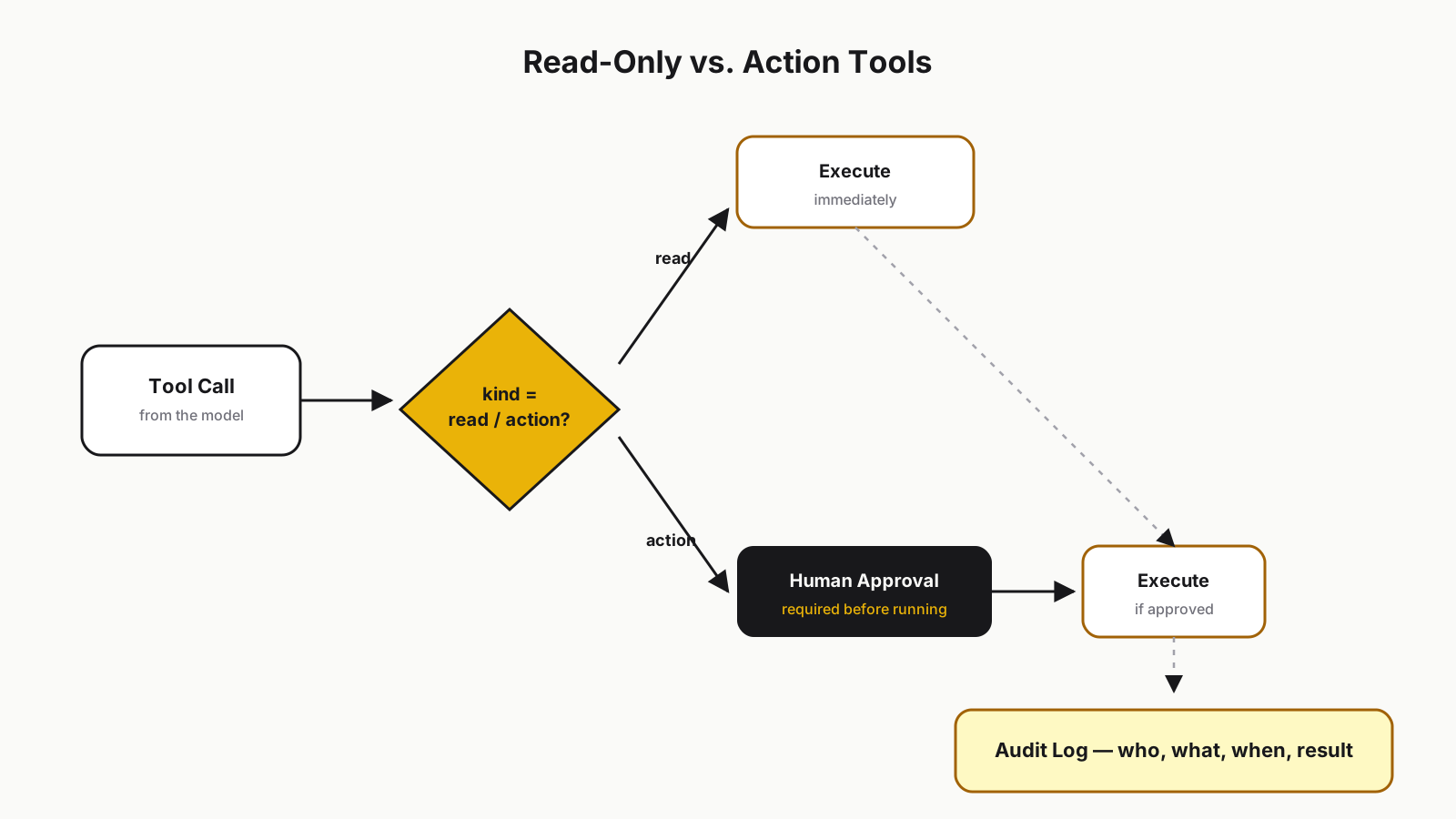 Splitting read-only and action tools: action tools route through human approval and get written to the audit log
Testing and Versioning
An MCP server is really an API contract — it just happens to have a language model as one of its consumers instead of only humans. That means it deserves the same discipline:
- Test the tool schemas. Write automated tests that confirm input/output shapes stay as expected. Changing a tool's description or a parameter name can silently break the behavior of every agent that calls it.
- Use semantic versioning. If you're changing a tool's behavior, ship it as a new version (
refund_payment_v2, say) and keep the old one alive for a while. - Test in the field, not just in unit tests. Run your server against a real agent doing real multi-step tasks — "refund this customer, but check their invoice first" — and see what actually happens. A model misreading a tool is at least as common a failure mode as a bug in the code itself.
Where This Is Heading
If you ask me, over the next few years companies are going to start building "MCP gateways" the same way they once built API gateways — as a standard piece of enterprise architecture. Right now every team is inventing its own MCP server from scratch, which looks a lot like the mid-2010s, when everyone wrote their own flavor of REST API. Consolidation is coming: shared auth layers, shared audit tooling, maybe even something like an "OWASP Top 10 for MCP servers."
For now, my advice is simple: design MCP like a production system, not a toy — because your users are going to start treating it exactly like one.
If you want the fundamentals of MCP first, my earlier post is a good place to start. Have you tried MCP inside your own company yet? I'd genuinely love to hear which pattern — or which anti-pattern — you ran into.
Grateful that you read this.
Take care, friends...