In the world of technology we run into a lot of terms, but some of them are basically silent heroes. Webhooks are exactly that kind of concept. So what is a Webhook, and why does it matter so much?
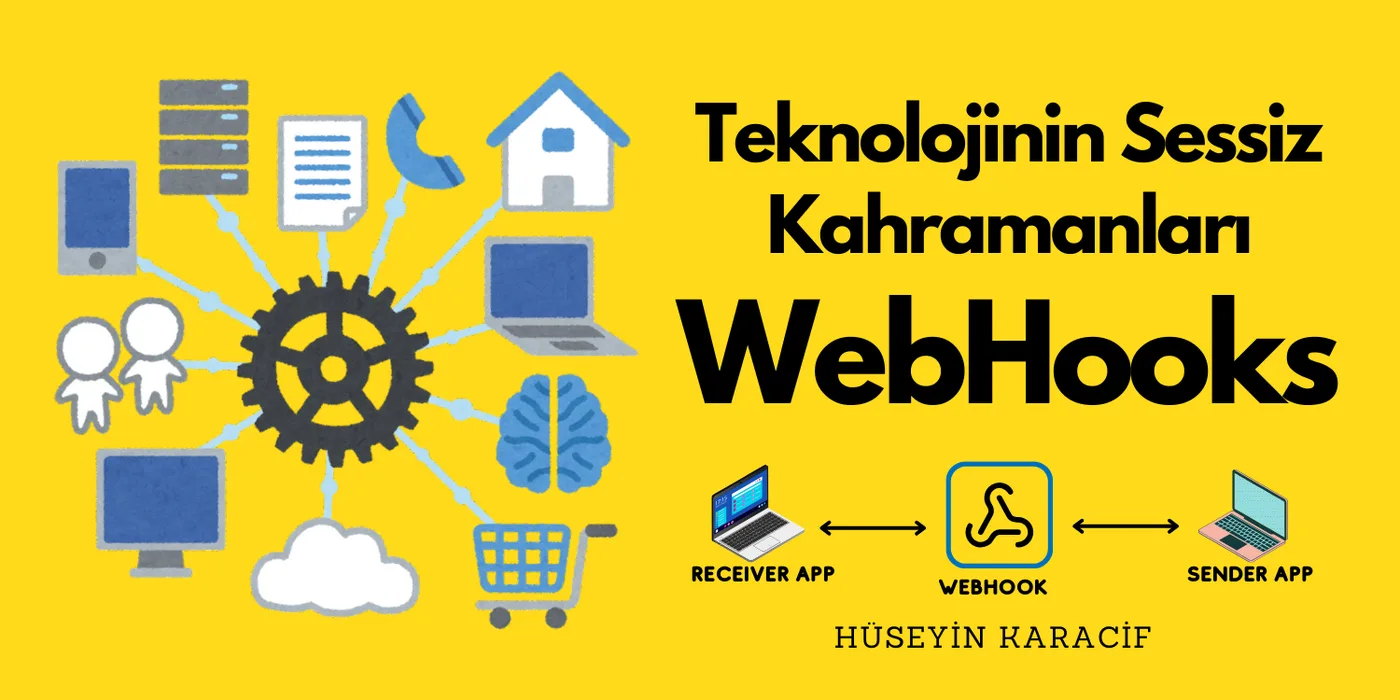
Webhooks are automated notification mechanisms that enable real-time communication between two systems. Put simply, they're the modern way for one application to tell another, "Hey, something just happened here, you should know about it!"
How Does a Webhook Work?
Let's explain it with an everyday example: think of a shipping company's SMS notification system. When your package is delivered, you automatically get a message. That's exactly how webhooks work — when an event happens, it automatically sends information to a predetermined address.
To give a technical example:
{ "event_type": "kargo_teslim", "order_id": "12345", "timestamp": "2024-03-21T10:30:00Z", "details": { "customer_name": "Hüseyin Karacif", "total_amount": 150.00, "status": "onaylandi" }}Webhooks in Our Everyday Lives
You can see example implementations from big companies below. Webhooks are everywhere. There's a village out there, far away, whether we know it or see it or not 😄
- Sending an automatic notification to the team's Slack channel when a PR is opened
- Triggering automatic builds in Jenkins, for CI/CD.
- Making project management easier — auto-updating tasks in Jira
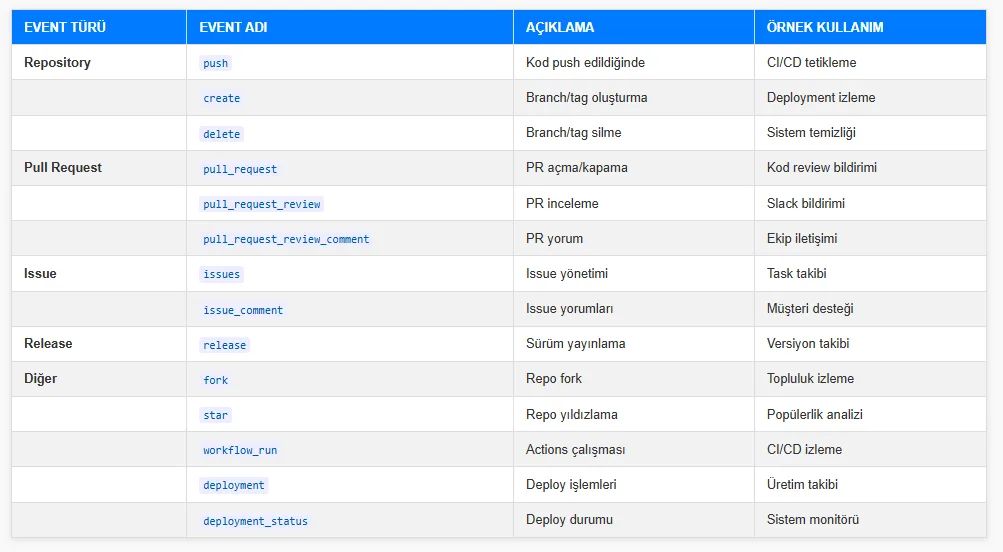 Github WebHook Events
- Stripe — Automatically updating the order system after successful payments
- Stripe — Instantly notifying merchant systems of payment status
- Paypal — Automatically notifying customer service of failed payments
- Paypal — Automatically alerting security teams when suspicious activity is detected
- Shopify — Instantly relaying stock updates to suppliers
- Shopify — Automatically notifying the shipping company when a new order is created
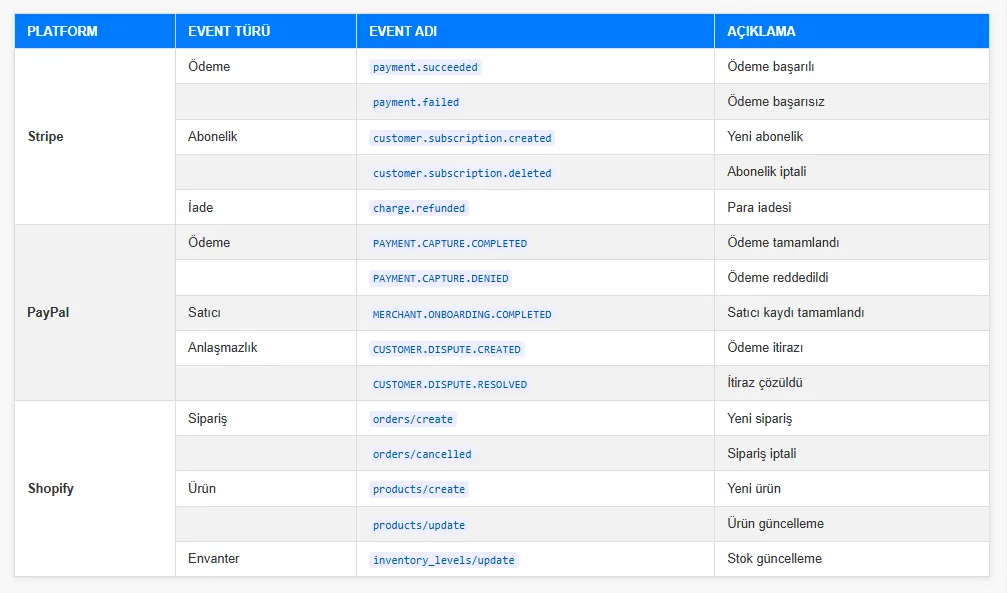 Stripe, Paypal, Shopify Webhook Events
- Automatically cross-posting to Facebook when a new photo is shared
- Feeding engagement analytics from business accounts into CRM systems
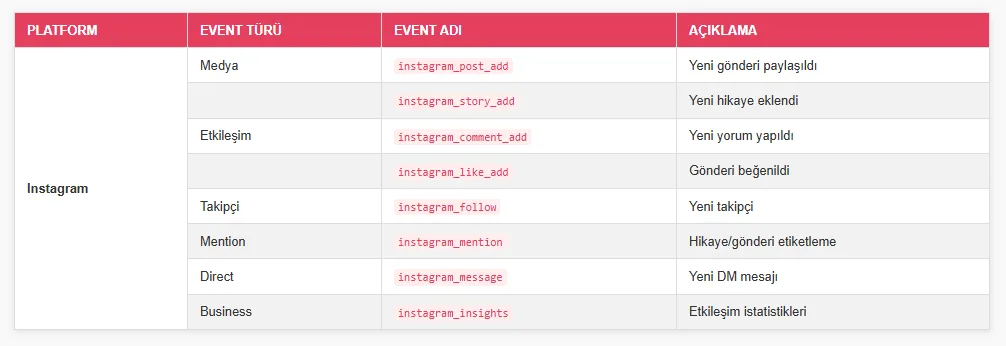 Instagram Webhook Events
When people think of webhooks, one of the first big companies that comes to mind should probably be Slack. Their team has built a genuinely nice ecosystem around this. 👏
- Integrating notifications from other apps into team communication
- Real-time syncing with project management tools like Trello and Jira
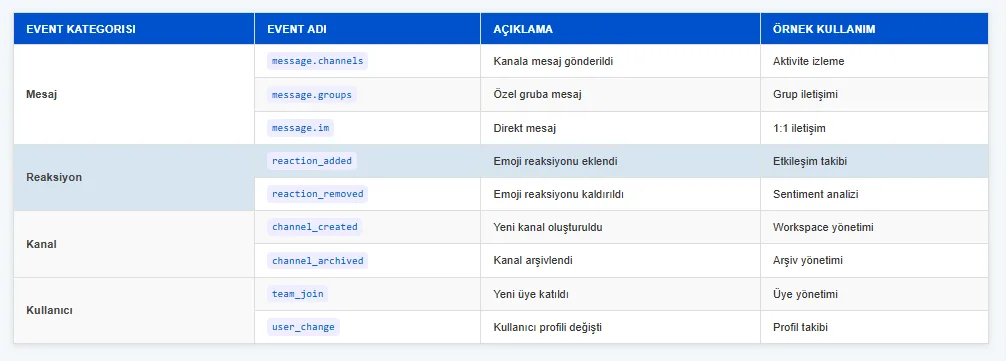 Slack Webhook Events
Incoming: For sending notifications from external systems
Outgoing: For simple chatbots and automatic replies
Slash Commands: For user commands and interactive actions
Events: For catching and processing complex events
A Small Example Using Express and Axios
Here's a small webhook example in JavaScript, to reinforce what we've learned — or remembered;
const express = require('express');
const app = express();

app.use(express.json());

app.post('/webhook', (req, res) => {
    try {
        const webhookData = req.body;

        console.log('Webhook verisi alındı:', webhookData);

        res.status(200).json({
            durum: 'başarılı',
            mesaj: 'Webhook verisi alındı'
        });
    } catch (hata) {
        res.status(500).json({
            durum: 'hata',
            mesaj: hata.message
        });
    }
});

// Sunucuyu başlatıp dinliyoruz...
const PORT = 3000;
app.listen(PORT, () => {
    console.log(`Sunucu ${PORT} portunda çalışıyor`);
});
We set up a server, wrote it to listen on the webhook endpoint, process incoming POST requests, and return a json message.
const axios = require('axios');

const test = {
    olay: 'new_order',
    sipariş_id: '12345',
    müşteri: 'Hüseyin Karacif',
    tutar: 150.99
};

async function webhookSend() {
    try {
        const response = await axios.post('http://localhost:3000/webhook', test);
        console.log('Webhook yanıtı:', response.data);
    } catch (err) {
        console.error('Webhook hatası:', err.message);
    }
}

webhookSend();
Here, axios delivers our new order to the webhook via an HTTP request. We log the server's response to the console. This is us testing sending a new order to the server via a real-time notification.
In short, what matters isn't learning how to use it, but understanding why it's used and what logic sits behind it.
Webhook vs. WebSocket vs. API: The Key Differences
Lastly, people new to webhooks often confuse them with WebSocket and APIs. It's worth knowing the fundamental differences between them.
Webhook (HTTP Push)
- One-way communication
- Event-driven
- The "push" principle: data is sent automatically as soon as it's ready
- Example: payment notifications, form submissions
WebSocket
- Two-way, real-time communication
- A continuously open connection
- Used when you need a live data stream
- Example: live chat apps, online games, stock market data
API (REST/HTTP)
- Triggered by the client (pull)
- Requires polling at regular intervals
- No instant notification capability
- Example: periodic polling to fetch weather data, retrieving a product list, CRUD
When Should You Use Which?
- Webhook: when you need an instant notification the moment a specific event occurs
- WebSocket: when you need real-time, two-way communication
- API: when on-demand data exchange is enough
I'm leaving a great resource on this topic here — it's best to act with the understanding that each technology gets used based on the specific need and situation.
Understanding API, Webhook, and WebSocket: When to Use Each
Grateful that you read this. Take care, friends...